
Improvements + Feature & API Updates

We've shipped major improvements to search performance, SEO tools, accessibility, and data freshness. Here's what's new.
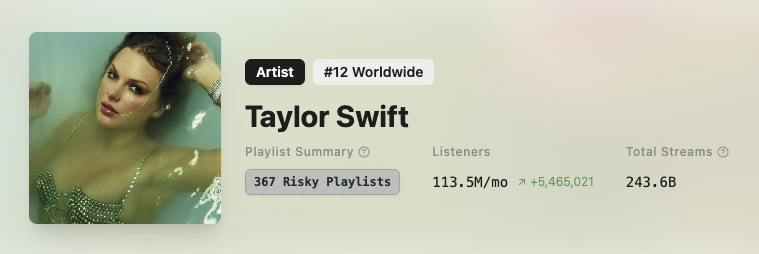
Total Streams for Artists
We've introduced a new metric for artists called "Total Streams", which reflects our aggregated total of all the streams on all their tracks.
We're building this number on artists on an as-requested basis, so if it's missing from an artist in your Dashboard, simply click on the artist, and we'll populate it.
Playlist Search Overhaul
We've completely rebuilt our Playlist Search infrastructure to deliver faster, more reliable results:
-
Infinite pagination — Search results now paginate seamlessly beyond 10,000 items. Previously, searches would fall back to our slower legacy system after the first 10,000 items.
-
Faster search resolution — Most searches now resolve in under a second, both on the Playlist Search page and through our API.
-
Better error messages — API responses now include clearer explanations when searches fail or encounter limitations.
-
Improved filter handling — Fixed bugs that caused slow loading or errors when combining multiple filters (like Genre + Contact filters + Quality filters).
You'll notice much less frequent fallbacks to our legacy search system, especially when browsing deep into results or using complex filter combinations.
SEO Tools Expansion
The SEO tab now includes three powerful new sections:
-
Google Rankings — See where playlists rank in Google search results, including estimated monthly traffic and SERP positions.
-
Google Backlinks — View all backlinks pointing to a playlist, with anchor text, source domains, and authority metrics.
-
Keyword Visualizer — Visualize keyword trends and performance over time to identify optimization opportunities.
The new Keyword Dashboard for playlists also displays Spotify keywords, Google keywords, and backlink counts at a glance.
SEO data automatically refreshes if it's more than 7 days old (usually earlier), so you'll always see up-to-date insights without manual intervention.
"Grayed Out" & Duplicate Tracks
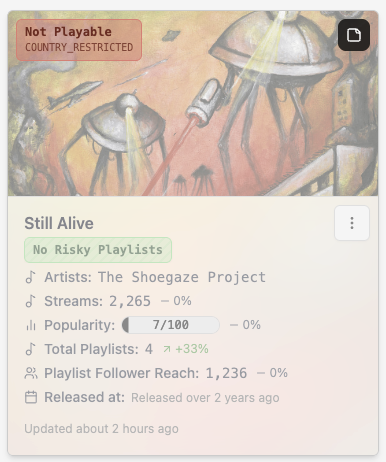
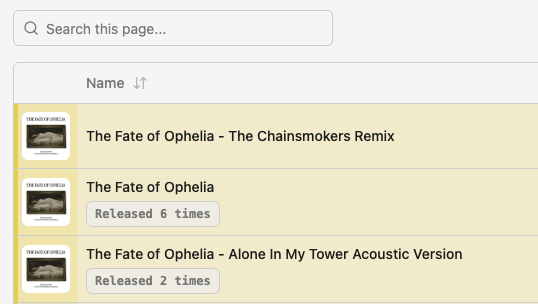
We now monitor 2 new attributes on tracks. It's "Playability" status, and if this track has been released more than once.
-
Playability Badge — Tracks that are not playable on Spotify (grayed out) are also grayed out on artist.tools, along with a Not Playable: COUNTRY_RESTRICTED badge (for example).
-
Duplicate Release Badge — In the context of the Tracks tab for Artist, we now show a Released X times badge when a track has been released multiple times. Clicking this badge will reveal the link to any duplicates. Since the same track (under different releases) can have different metrics, this feels like an important nuance to make users aware of.
Accessibility Improvements
We've added extensive ARIA support throughout the app to improve screen reader compatibility:
-
Buttons, icons, and interactive elements now include descriptive labels
-
Form inputs display validation states clearly for assistive technology
-
Modal dialogs, tooltips, and search actions are properly announced
Data Freshness Upgrades
We've made substantial improvements to how we keep your data current:
-
More playlists, artists, and tracks now update within 24 hours
-
SEO data automatically refreshes when it becomes stale (7+ days old)
-
Playlist snapshots are taken daily to ensure historical data accuracy
-
Reduced the number of cases where data appears outdated
You'll see fewer "Last updated 3 days ago" notices, especially for frequently monitored playlists and artists.
UI Consistency & Polish
We've unified styling across the app for a more cohesive experience:
-
Standardized alerts — All alerts, notifications, and upgrade prompts now share consistent styling and iconography.
-
Dashboard improvements — Multi-folder selection, optimistic updates, and server-side sorting make navigating large collections faster.
-
Better tooltips and hints — Search tips, feature explanations, and contextual help are now clearer and easier to find.
-
More performant charts — Viewing charts in large datasets (500+ days) now consumes fewer client resources and scrubs more smoothly.
Bug Fixes
We've also squashed several bugs reported by the community:
-
Fixed sorting issues with the Streams column in playlist tables
-
Resolved errors when clicking playlist owner names in search results
-
Fixed slow loading when using dashes in playlist searches
-
Corrected publication date and popularity score calculation bugs
Have feedback on these changes or suggestions for what's next? Let us know.