
Connect artist.tools to MCP-compatible AI clients
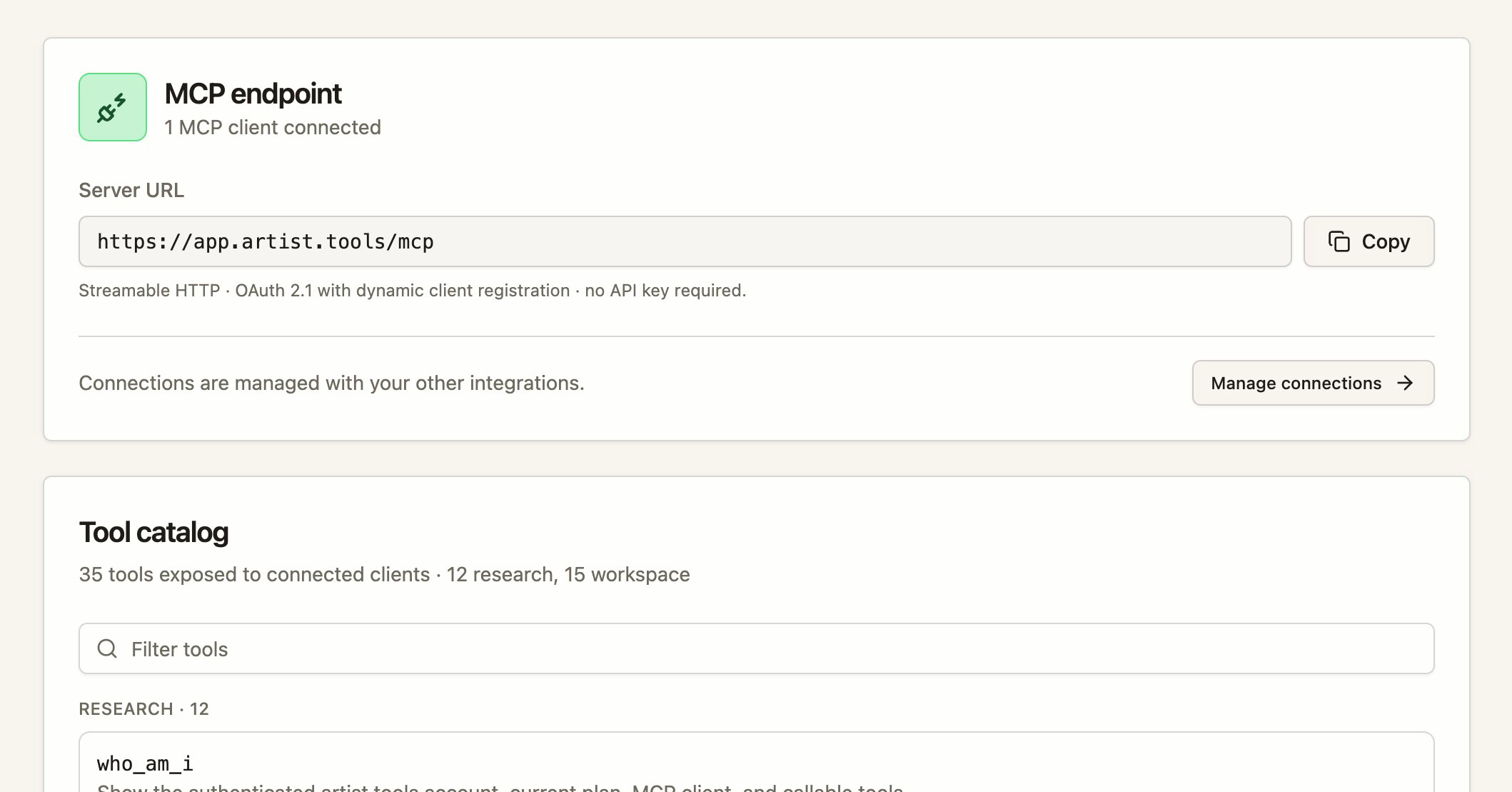
artist.tools now works as a remote MCP (Model Context Protocol) server, so you can run artist.tools tools directly from Claude, ChatGPT, Cursor, Grok, Gemini, Perplexity, GitHub Copilot, Windsurf, and Zed — or any other client that speaks MCP over streamable HTTP.
What's new
-
MCP endpoint — Add artist.tools as a remote MCP server using your artist.tools address followed by
/mcp. -
OAuth 2.1 connection flow — Authorize a client with an authorization-code + PKCE flow and a single
mcpscope. Approve or deny the connection on the "Authorize MCP Connection" page, and revoke it any time from Settings > Integrations. -
Research tools — Resolve and search artists, tracks, playlists, and curators; get entity details, track credits, keywords, SEO metrics, and backlinks.
-
Workspace tools — Manage entity and keyword folders, saved keywords, and notes.
-
Admin support tools — Administrators can approve a connection for admin tools (user support context, playlist quality, contact fields, AI labels, and entity refresh). Admin tools require both an admin account and explicit approval on the consent screen.
Permissions
-
Research and workspace tools require the Developer Access plan. The
who_am_itool is available on every plan. -
You can connect a client on any plan, but without Developer Access the connection stays active while tool calls are locked.
-
Manage your API key and developer settings in the Developer Console.
Rate limits
-
Global account ceiling: 120 requests/minute, 10,000 requests/day, max 4 concurrent requests.
-
Per-tool-group limits apply (e.g. Search 60/min, Workspace writes 30/min, Provider enrichment 2/min).
Get started
SEO Improvements, UX Refinements + Bug Fixes
We're continuously improving artist.tools based on your feedback. Here's what's changed recently.
SEO & Keyword Tables Are More ActionableThe SEO keyword tables have been redesigned to make trends easier to spot and decisions easier to make.
-
Genre Alignment — A new column shows how well each keyword fits your genre, labeled from Best to Worst. This helps you quickly identify which keywords are most relevant to your music.
-
Position History with Color — The ranking position sparkline now uses color to show trend direction at a glance, making it faster to spot improving, declining, or stable positions.
-
Clearer Trend Signals — Growth indicators and trend calculations now use fresher data, so the numbers you see better reflect recent changes.
Keyword results now sort more reliably, and you have more ways to filter and organize your saved keywords:
-
Improved sorting options keep your results in a consistent order.
-
New filter controls help you narrow down keyword lists faster.
-
Saved keyword groups now skip entries that failed to refresh, so your saved views stay clean and current.
If you haven't set up bot detection alerts yet, the new empty-state experience walks you through how it works:
-
Add artists or playlists to your watchlist.
-
We scan continuously for suspicious streaming activity.
-
You get email alerts when something needs attention.
Free users now see clearer upgrade paths and help links directly from the bot detection area.
Editorial Pitch Generator Has a Fresh StartThe Editorial Pitch Generator page now includes a guided empty state if you haven't created a pitch yet. The steps explain the full workflow:
-
Generate your pitch using the AI tool.
-
Submit it on Spotify for Artists.
-
Track placements over time.
Press coverage is now easier to find with a dedicated Press Mentions tab in the SEO & Press area. This separates your media mentions from other SEO data and makes them faster to review.
Folder Selection Got Keyboard ShortcutsWhen you're working with folders—whether entity folders on the Dashboard or keyword folders in SEO—you can now multi-select faster:
-
Press Command on Mac or Control on Windows while clicking to toggle individual folders.
-
Press Shift while clicking to select a range of folders.
-
Press Command/Control+A to select all folders.
-
Press Escape to return to a single selected folder.
Playlist results now include richer background information, so you can evaluate opportunities faster without opening each playlist individually.
Changes to "AI-Identified" BadgingMany artists made complaints that their tracks were detected as "AI-generated", when in fact, it was AI being used in more subtle parts of the audio chain (ie, their producer used AI-generated stems, mixing/mastering tools, etc).
We've refined the wording to make our AI detection clearer on this distinction.
Other Improvements-
Backend groundwork laid for future YouTube playlist tracking and analysis.
-
Trend and growth charts now use more recent data for current calculations.
-
Keyword analytics now shows an additional growth total column.
-
More consistent keyword rules and filter behavior across the app.
-
Sort dropdown menus are now visible in tables, whereas before, clicking a column was the only way to sort tables.
Drag-and-Drop, New Free Tools, & Many Refinements
Since the last update (Content Analysis, Expanded Search, and Press Mentions), we've been focused on making it faster to pivot between entities, smoothing out the mobile experience, and launching a trio of free tools for the broader community.
Sidebar, now with drag-and-dropThe sidebar widget dock has been quietly available for a little while, and it deserves its own spotlight. It lets you pop an entity or a keyword into a side panel without leaving your current page. This is perfect for cross-referencing a track while you're deep in a curator's playlists, or keeping a keyword open while you compare artists.
What's new in this release:
-
Drag any row into the dock. Grab a row in an entity table, keyword table, or entity card and drag it toward the sidebar. A drop zone slides out automatically, and a preview tile follows your cursor so you always know what you're about to dock.
-
Drag and drop directly from Spotify. Drag and drop items from Spotify directly into the artist.tools Sidebar. Great if you have two monitors. Previously, you had to copy the link into the search bar. Now, simply drag and drop!
-
One-click maximize. The header now has a "maximize" button to jump straight to the full page.
-
Session-persistent. Your last docked entity and keyword stick open as you navigate around the site. It's no longer isolated to the page you're on.
We redesigned the layout of the Track Changes to be more usable on mobile and accommodating on desktop.
We also added a few QOL details on playlists, like:
-
Discovered On Coverage. This metric shows what % of the artists included have this playlist appearing on their 'Discovered On' section on Spotify, which represents the artists top 50 most impactful playlists.
-
Listener Engagement. Also sourced from Discovered On data, estimates how engaged the playlist is (listeners) relative to its follower count.
-
Collaborator Changes. You can now use filters like 'Only changes as a collaborator on someone else's playlists' that show changes made to playlists this curator doesn't own.
We rebuilt the mobile entity view for noticeably snappier interaction:
-
Swipe-to-change-tabs is gone. The carousel that paged between Overview / History / Press / SEO / etc. was preloading every tab and fighting with horizontal scrolls inside tables. Tabs now render only when you open them, which dramatically cuts memory use and stutter, especially on older phones.
-
Smoother compact header. The shrink-on-scroll entity header no longer re-measures itself on every frame, and its transition is noticeably cleaner.
-
Press is now a top-level tab. On every entity, Press (backlinks and press mentions) is promoted from a sub-tab under SEO to a first-class tab with its own skeleton and loading behavior. Old
?section=seo-press-coveragelinks still deep-link correctly.
The bottom nav on mobile has been redesigned around a prominent Search pill in the center, flanked by circular icon buttons (Home, Alerts, Upgrade / SEO, and your avatar). Every button now gives a small haptic tap on press.
Three new free toolsThree free tools are live under More Tools in the sidebar, and each is public, indexable, and embeddable:
-
AI Song Checker. Paste or search any track, and we'll tell you whether it's been flagged as AI-identified.
-
Playlist Name Generator. Generate SEO-friendly playlist names tuned for Spotify discovery.
-
Spotify Popularity Score Checker. Look up any track, artist, or playlist's popularity score and how it's trended over time.
You can now explore entity pages, pricing, and all three new tools without an account. The sidebar renders in a guest-friendly state with a clear Sign in / up button and subtle lock icons on tools that require a paid or Industry plan, so you can see what's available before you commit.
Preferences: date format, persisted rangesIt's been made clear that relative dates (eg, about 2 years ago ) lacked precision in places that needed it.
-
Date format preference. Toggle between relative ("3 hours ago") and full dates ("Apr 21, 2026, 3:14 PM") in Settings → Preferences. The choice applies everywhere dates show up.
-
Date ranges now persist globally. The range picker on entity tables and reusable charts remembers your choice across sessions, so your preferred window carries across keyword tables, entity trends, and chart modals.
-
Hover dates for more precision. Hovering relative dates (
about 2 years ago) now shows precise dates. Similarly, in full date mode, hovering shows relative dates.
Visitors who arrive via a referral link now see a friendly, dismissible banner letting them know they'll get 10% off any plan, forever, resurfaced once per session until they pick a plan.
Bug fixes and smaller improvements-
Sorting actually sorts now. In a few places, most notably keyword rankings tables and some paginated entity tables, clicking a column header would flip the arrow but leave the rows in the same order. Sort now correctly rounds-trip through the server and the visible page, so the column you click is always the column that drives the order.
-
Items not appearing in Dashboard. We discovered a bug when adding items to your Dashboard through the "Add Playlist" / "Add Artist", etc., button that prevented items from being correctly displayed. This is now resolved.
-
"Add" Modal in Dashboard (also tracks, artists, curators)
-
If your search comes up empty, the modal now hints that you can paste a Spotify URL directly, and the placeholder copy calls this out up front. A small hint also appears below the results list so it's discoverable even when you do get results.
-
The mobile drawer had scroll physics that fought the drawer gesture on long result lists. Fixed. Scrolling long results now behaves naturally without accidentally closing the drawer.
-
-
Curator loading copy. When a curator's playlists are still being ingested or refreshed in the background, you'll see clearer status copy ("Still loading 12 playlists for this curator…" or "Refreshing this curator's playlists…"), plus a matching success toast when it completes.
-
History tab stays fresh. After a background refresh settles, the History tab refetches automatically, so you won't see stale events after an update.
-
Staggered table refresh shimmer. When an entity collection refreshes, rows now animate into their refreshing state in a wave, making it obvious which rows just updated.
-
Sidebar: locked tools are visible. Tools that require a paid or Industry plan now show a subtle lock icon in the sidebar instead of being hidden, so you can see the full surface area of the product at a glance.
-
Playlist Search > Collaborating On. You can now filter for collaborators on a playlist on the Playlist Search page. Incredibly useful for tracking PR companies, etc.
-
Bot Alert Badge. We now show a bell icon on entities with Bot Detection Alerts enabled, which makes it easier to spot if you're being notified for suspicious activity.
-
More consistency in the UI. Many of the same stats, badges, etc, were presented differently around the site. We've started uniforming the same data as it's presented across the site.
-
Search by trending for Track & Artist Search. We released artist, track, and curator search on the Industry Access plan last update, and it's clear it's missing a way to sort by "what's blowing up right now?".
-
Performance improvements for mobile.
-
Random reloads/logouts. Some users report the page spontaniously reloading, or being randomly logged out. This is something that we're actively trying to resolve.
Content Analysis, Expanded Search, and Press Mentions
We’ve shipped a round of search and SEO updates to help you research opportunities faster, spot better playlist fits, and review off-platform coverage with less clicking. This release adds a new Content Analysis workflow on keyword pages, expands the /search page beyond playlists, and brings Press Mentions into more places across the app.
These new search and SEO features are part of the Industry Access plan.
Expanded search: Artists, Tracks, and CuratorsThe /search page now supports more than playlist discovery. Industry Access users can now search across Artists, Tracks, and Curators, alongside the existing Playlists and Keywords views.
This makes the search page more useful when you want to move between different types of research without changing tools. You can start with a playlist search, switch to artist or track research, or move into curator discovery from the same area.
For users on plans without Industry Access, the page now makes those additional search types more visible as upgrade-gated features instead of hiding them behind separate workflows.
New: Content Analysis on keyword pagesThe keyword page now includes a new Content Analysis tab inside the Spotify view. This gives you a faster way to study what shows up across the top ranking playlists for a keyword instead of reviewing each playlist one by one.
The new workflow includes Track Overlaps, which highlights tracks that appear in at least two of the top ranking playlists for that keyword. You can use this to spot repeat appearances across the Top 50 Playlists and get a clearer view of the songs already clustered around a search term.
The content analysis tools also add text analysis controls so you can review playlist language at different levels, including all, words, and phrases. That makes it easier to understand how top playlists are described and how they frame a keyword in practice.
If you’re already using Keyword Search to find terms worth targeting, this update gives you a stronger next step once you open the keyword detail page.
Press Mentions across SEO and entity pagesWe’ve also expanded Press Mentions visibility. You can now find this information in the SEO playlist workflow and across entity pages for artists, tracks, playlists, and curators.
That means you can review press and mention signals closer to the page you’re already working in, instead of bouncing between separate SEO views to gather context. This makes it easier to connect search research, playlist evaluation, and outside coverage in one flow.
For more on how press coverage works in artist.tools, see Backlink Mentions and Press Coverage.
Fewer clicks and cleaner workflowsThis release also includes a broad set of interface refinements across these pages. The goal is simple: make the product easier to scan, reduce extra steps, and help you get to the next useful action faster.
You’ll see this in the way analysis views are organized, how search options are surfaced, and how related SEO context now appears directly on entity pages. The result is a smoother research workflow whether you’re qualifying playlists, checking keyword competition, or reviewing curator and press signals.
Where to start-
Use Keyword Search to find a keyword worth exploring.
-
Open the keyword page and review Top 50 plus the new Content Analysis tab.
-
Use the expanded /search page to jump into artist, track, or curator research.
-
Review Press Mentions on playlist and entity pages to add outside context before you pitch or analyze a target.
If you want a deeper walkthrough of keyword analysis, see Keyword Page and Playlist SEO tab.
Improvements: Overview Tab & General UX
We've rolled out major improvements to your dashboard organization, trend displays, and entity overview pages. Here's what's new:
Drag-and-Drop Folder ReorderingYou can now reorder your folders in the dashboard to match your workflow. Simply drag any folder chip to a new position—the others will slide out of the way. Your custom order saves automatically and persists across sessions. Perfect for prioritizing active campaigns, organizing by genre, or grouping by release goals.
The "Contacted" playlist folder stays at the front and can't be reordered—it's designed to be always accessible.
Unified Trend PreferencesYour trend display settings now sync across the entire platform—dashboard tables, entity pages, mini-charts, and modals all respect your preferences:
-
Trend format: Show changes as percentages ("+12%") or absolute numbers ("+1.2K")
-
Number format: Compact ("1.5M") or full digits ("1,500,000")
-
Default date range: Set your preferred timeframe from 24 hours to all-time (free users can view up to 7 days)
Adjust these anytime in Settings → Preferences. Changes take effect instantly across all charts and tables.
Redesigned Overview TabThe Overview tab for artists, tracks, and playlists now surfaces critical insights front-and-center. We've restructured the layout to show more relevant data at a glance:
For Artists-
Discography summary: See album, EP, and single counts plus total streams across all releases
-
Top listener cities: Discover where your audience is concentrated with city-level data and listener counts
-
Playlist impact: Estimated percentage of your listeners coming from playlists, plus high-risk playlist appearances
-
Risk alerts: Clear warnings if you're appearing on high-risk playlists
-
Playlist stats: Total appearances, high-risk count, combined follower reach, and estimated listeners from playlists
-
Enhanced metadata: Release date, ISRC (with quick-copy tooltip), and all contributing artists
-
Risk alerts: Instant visibility if the track is on risky playlists
-
Quality labels: Immediate flags like "Potential Artificial Growth Detected" at the top
-
Discovered On analysis: See which artists are in the playlist, which aren't, plus a Discovery Score (0-100) with sortable tables showing artist names, monthly listeners, days in playlist, position, and top city
-
Audience distribution: Estimated listener breakdown by city and country
-
Fraud history: Historical bot activity (unlocked for Pro users)
All Overview tabs now include a prominent headline chart (monthly listeners, followers, or streams depending on entity type) with a "View all charts" link, plus a Recent History card linking to full historical data.
Album Support Coming SoonWe're laying the groundwork for full album analysis across the platform. While albums aren't fully supported yet, you'll see a placeholder page at /album/:id letting you know we're working on it. In the meantime, you can search and analyze individual tracks from any album.
Additional Improvements-
Fixed table scrolling: Left columns now stay pinned when scrolling horizontally through wide data tables
-
Improved sorting: Streams and monthly listeners columns now sort correctly in all tables
-
SEO keyword visibility: Expanded "Last Seen At" data in keyword tables for better playlist search tracking
Free users can see trend data for the past 7 days.
Improvements: General UX
Refine some things in the UI.
Things like:
-
Compressed long numbers
1,653,098,124) into compressed strings like1.63B, making large numbers more digestible at a glance. -
Migrated "Activity Feed" under Tracks/Playlist tab, so it's clearer what this activity feed is about.
-
Unified the shapes and sizes of badges across the site.
-
Various improvements in digesting bug reports & client errors to fix more pre-emptively.
-
Various non-memorable bugs fixed.
Improvements + Feature & API Updates
We've shipped major improvements to search performance, SEO tools, accessibility, and data freshness. Here's what's new.
Total Streams for ArtistsWe've introduced a new metric for artists called "Total Streams", which reflects our aggregated total of all the streams on all their tracks.
We're building this number on artists on an as-requested basis, so if it's missing from an artist in your Dashboard, simply click on the artist, and we'll populate it.
Playlist Search OverhaulWe've completely rebuilt our Playlist Search infrastructure to deliver faster, more reliable results:
-
Infinite pagination — Search results now paginate seamlessly beyond 10,000 items. Previously, searches would fall back to our slower legacy system after the first 10,000 items.
-
Faster search resolution — Most searches now resolve in under a second, both on the Playlist Search page and through our API.
-
Better error messages — API responses now include clearer explanations when searches fail or encounter limitations.
-
Improved filter handling — Fixed bugs that caused slow loading or errors when combining multiple filters (like Genre + Contact filters + Quality filters).
You'll notice much less frequent fallbacks to our legacy search system, especially when browsing deep into results or using complex filter combinations.
SEO Tools ExpansionThe SEO tab now includes three powerful new sections:
-
Google Rankings — See where playlists rank in Google search results, including estimated monthly traffic and SERP positions.
-
Google Backlinks — View all backlinks pointing to a playlist, with anchor text, source domains, and authority metrics.
-
Keyword Visualizer — Visualize keyword trends and performance over time to identify optimization opportunities.
The new Keyword Dashboard for playlists also displays Spotify keywords, Google keywords, and backlink counts at a glance.
SEO data automatically refreshes if it's more than 7 days old (usually earlier), so you'll always see up-to-date insights without manual intervention.
"Grayed Out" & Duplicate TracksWe now monitor 2 new attributes on tracks. It's "Playability" status, and if this track has been released more than once.
-
Playability Badge — Tracks that are not playable on Spotify (grayed out) are also grayed out on artist.tools, along with a Not Playable: COUNTRY_RESTRICTED badge (for example).
-
Duplicate Release Badge — In the context of the Tracks tab for Artist, we now show a Released X times badge when a track has been released multiple times. Clicking this badge will reveal the link to any duplicates. Since the same track (under different releases) can have different metrics, this feels like an important nuance to make users aware of.
We've added extensive ARIA support throughout the app to improve screen reader compatibility:
-
Buttons, icons, and interactive elements now include descriptive labels
-
Form inputs display validation states clearly for assistive technology
-
Modal dialogs, tooltips, and search actions are properly announced
We've made substantial improvements to how we keep your data current:
-
More playlists, artists, and tracks now update within 24 hours
-
SEO data automatically refreshes when it becomes stale (7+ days old)
-
Playlist snapshots are taken daily to ensure historical data accuracy
-
Reduced the number of cases where data appears outdated
You'll see fewer "Last updated 3 days ago" notices, especially for frequently monitored playlists and artists.
UI Consistency & PolishWe've unified styling across the app for a more cohesive experience:
-
Standardized alerts — All alerts, notifications, and upgrade prompts now share consistent styling and iconography.
-
Dashboard improvements — Multi-folder selection, optimistic updates, and server-side sorting make navigating large collections faster.
-
Better tooltips and hints — Search tips, feature explanations, and contextual help are now clearer and easier to find.
-
More performant charts — Viewing charts in large datasets (500+ days) now consumes fewer client resources and scrubs more smoothly.
We've also squashed several bugs reported by the community:
-
Fixed sorting issues with the Streams column in playlist tables
-
Resolved errors when clicking playlist owner names in search results
-
Fixed slow loading when using dashes in playlist searches
-
Corrected publication date and popularity score calculation bugs
Have feedback on these changes or suggestions for what's next? Let us know.
Improvements: More Speed & Less Clicks
We've rolled out several updates to make artist.tools faster, smarter, and easier to use. Here's what's changed and how it impacts your workflow.
Fewer Clicks, More Efficiency Entity Views Remember Your Date RangesWhen you select a date range in Entity Views (Artists, Tracks, Playlists, Albums), your selection is now saved automatically. No need to re-select "Last 30 Days" or "Last 3 Months" every time you navigate back to a view.
This applies across all entity types—Artists, Tracks, Playlists, and Albums. Set it once, and your preference sticks.
Mini Charts Open with Your Selected Date RangePreviously, clicking a sparkline (Mini Chart) in an entity view would open the detailed chart with a default date range. Now, the chart modal inherits whatever date range you're already viewing on the page. If you're looking at "Last 7 Days" on your playlist view, the Mini Chart will open to that same range.
Keyword Table Remembers Your PreferencesThe Keyword Explorer table now retains your column selections and sorting preferences. If you've customized which columns to display or how to sort your keywords, those settings persist across sessions. Less repetitive setup, more analysis.
You can also filter for stale data and prioritize bookmarked keywords directly in the table.
Faster Playlist SearchWe've integrated ElasticSearch to speed up playlist searches across the platform. In 90% of search contexts, you'll notice significantly faster results—especially when searching for playlists with special characters or complex names.
We're still migrating some search contexts to the new system. You may occasionally see searches handled by our legacy system, but we're working to complete the full transition soon.
More Reliable, Up-to-Date DataWe've optimized our backend infrastructure to keep your tracked entities fresher than ever. Here's what that means for you:
-
24-Hour Coverage Increase: We're now updating entities more consistently across the board, with a massive improvement in 24-hour coverage for all tracked artists, playlists, and tracks.
-
Zero Delays for Critical Alerts: Entities in folders, bot detection alerts, and other priority areas are now updated within 24 hours—100% of the time. No more stale alerts or outdated folder data.
While we're updating entities faster, historical data beyond 7 days and advanced bot detection alerts require an Artist Access or Industry Access subscription.
Why This MattersThese updates are designed to reduce friction in your daily workflow. Whether you're monitoring bot activity, analyzing keyword trends, or tracking playlist performance, you'll spend less time clicking and waiting—and more time making informed decisions about your music career.
AI-Powered Playlist Search & Improvements
We've added AI-powered search to help you find playlists using natural language, plus fixed major bugs that were causing search errors, infinite loading, and incomplete data. Searches are now faster, more reliable, and easier to use.
The biggest change: You can now describe what you're looking for in natural language, and AI will automatically apply the right filters and sorting for you.
New Features AI Assist for Playlist SearchYou can now use natural language to search for playlists. Just toggle the AI Assist button (with the sparkle icon) next to the search input and describe what you're looking for in plain English.
Try queries like "indie pop playlists for summer releases" or "upbeat electronic playlists for new artists" and let AI automatically apply the right filters and sorting for you.
How it works:
-
Click the AI Assist button on the Playlist Search page
-
Enter your search in natural language (the placeholder will change to "Tell the AI what playlists to find...")
-
Press Enter and wait a few seconds while AI processes your request
-
View your results with an explanation of what filters were applied
The AI interprets your input and automatically sets genre filters, popularity sorting, and other criteria. If anything goes wrong, the search falls back to standard keyword matching. This feature is available on all plans.
Enhanced Search FiltersPlaylist and keyword searches now support more precise filtering options:
-
Multi-select exclusions - Exclude specific genres, playlist types (like "radio"), or contacted playlists from your results
-
Genre dropdowns - Select from predefined genres like Rap, Hip Hop, and more
-
Follower and popularity sliders - Set minimum and maximum thresholds to narrow down results
-
Outreach history integration - Use the "Exclude contacted playlists" checkbox to filter out playlists you've already reached out to
All searches default to 10 results per page with pagination support, and you can force-refresh to get the latest data.
Bug Fixes Keyword Search ImprovementsWe've resolved multiple issues with keyword search functionality:
-
Fixed incomplete data retrieval - Keyword searches now reliably return complete Google and Spotify metrics (volume, followers, growth) without errors or "processing-incomplete" responses
-
Cleaned up API outputs - Removed internal fields from visible results for cleaner tables and charts
-
Improved handling of edge cases - URL-like search terms and invalid market selections now properly default to US market with clear error messages
Keyword searches are now faster and more reliable, with complete data showing in sortable columns.
Search Loading and StabilityFixed several critical issues that were causing search problems:
-
Resolved infinite loading states - Searches no longer get stuck in endless loading loops
-
Fixed sorting stalls - Sorting by listeners and other metrics now works without freezing
-
Corrected database errors - Eliminated "readPreference is not a function" errors when clicking on playlist owners or viewing details
-
Added error boundaries - Failed searches now show a clear "Failed to load – retry" message instead of crashing
-
Implemented skeleton loaders - Better visual feedback during high-latency queries
Playlist detail pages and CSV exports are now more stable:
-
Fixed page crashes - Eliminated TypeError crashes when viewing playlist entities
-
Improved export completeness - CSV exports now include all fields (name, followers, curator) without missing data
-
Added retry functionality - "Entity not found" errors now show a retry button instead of a blank page
-
Better error handling - React error boundaries prevent entire page crashes
Several mobile-specific issues have been resolved:
-
Fixed stuck modals - Search overlays no longer get stuck on mobile devices during screen rotation
-
Resolved loading issues - Eliminated pinwheel loading states when selecting songs
-
Improved drawer modals - Better backdrop blur and modal behavior on mobile
-
Safari compatibility - Fixed playlist loading failures specific to Safari browsers
Playlist and keyword data now updates more reliably:
-
Automatic daily updates - Backend now better auto-updates playlist snapshots
-
Timestamp badges - All playlist and keyword views show "Updated at [timestamp]" so you know when data was last refreshed
-
Track listing accuracy - Playlists no longer show outdated track lists or activity data
Data freshness improvements ensure you're always working with current information when planning outreach campaigns.
API Update: SEO Endpoints
We're excited to announce the release of our new SEO endpoints as part of our broader rollout of Spotify SEO capabilities in the artist.tools API. These powerful endpoints give you access to keyword analytics, search volume trends, and playlist insights to help you understand and optimize your Spotify presence.
SEO endpoints are now available to all Developer Access users. Start leveraging keyword intelligence to drive better Spotify strategy.
What's newWe've added two new endpoints that let you tap into keyword-level data:
Get Keyword InsightsRetrieve detailed analytics for a specific keyword, including Google Trends data and Spotify playlist metrics. This endpoint returns volume trends, growth rates, genre breakdowns, and playlist reach information.
Endpoint: GET /keywords/{keyword}
Use cases:
-
Monitor search volume and trend patterns for keywords relevant to your music
-
Understand playlist follower reach and growth rates for keywords
-
Analyze genre distribution for playlists tagged with specific keywords
-
Refresh data on demand or track changes over time
Search across our keyword database with filters, pagination, and sorting. Find keywords by market, search volume, Spotify trends, and more.
Endpoint: GET /keywords/search
Use cases:
-
Discover high-volume keywords in your genre or market
-
Filter keywords by exact match, market, or custom criteria
-
Sort results by Spotify follower metrics to identify trending topics
-
Paginate through results to analyze keyword landscapes at scale
Visit our API documentation to explore both endpoints. You'll find detailed parameter descriptions, example requests, and response formats.
Pro tip: Use the exactMatch parameter when searching keywords to focus on precise terms, or leave it off to capture related variations.
SEO endpoints require your developer API key, just like all other artist.tools API resources. If you don't have API access yet, contact support to upgrade to Developer Access.
What's nextThis is just the beginning of our Spotify SEO rollout. We're actively developing more SEO-related endpoints and features. Let us know what other SEO endpoints or insights you'd like to see! Your feedback directly shapes our roadmap.
Have ideas for additional SEO capabilities? Reach out to support with your feature requests or visit our feedback portal.
Limitations-
Keywords must be a minimum of 3 characters
-
Google Trends data may be compressed or trimmed based on request parameters
-
Keyword data updates periodically; use the
updateparameter to refresh data on demand
Check our full API documentation or contact our support team for help getting started with the SEO endpoints.